Wordle and WordSift
I have used
Wordle with my elementary students as an All about Me, describing an animal or famous person they had researched, and as reflection about what they learned during the school year. The biggest problem with this software is the many tedious steps you have to go through to save the Wordle if you want to use it in another software program like Photo Story, embed it in a blog, or if you just want to print it. My students love experimenting with the layout, font, and color options.
WordSift embodies student connectivity and
The Networked Student concepts well. I tried the
Preamble to the Constitution and came up with this image:
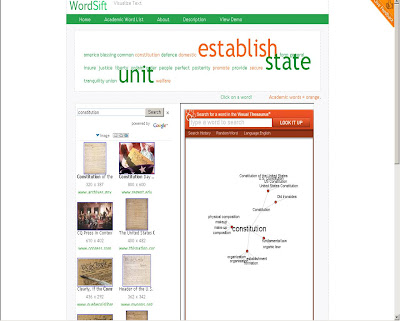 I like the way it links the tag cloud to an interactive visual thesaurus with a speaker option for hearing word pronunciations, a language option for translating into Spanish, Google image and video searches, and sample sentences for context use. The few unexpected and inappropriate images from the results of the Google image and software searches was the only drawback I found to using this software with elementary students.
How could students use this tool? Write a poem or short story or report and WordSift it to discover hidden meanings, new meanings, or more in-depth information and images about the topic. WordSift an article or excerpt from a book and go through the word layers and image/video links to discover new meanings or insights.
Vokis
Vokis are colorful, entertaining, eye-catching, interactive, got your attention fun. A few ways they could be used:
- to introduce and/or give directions on a web site or email
- as a vehicle for commenting on a wiki
- by students to create a short “All About Me” at the beginning of a school year or a "Who am I?" or "What am I?" like the following Uncle Sam example
Get a Voki now!
VoiceThread
VoiceThread is my new favorite software. I created a VoiceThread called Sculpting Chicago as an activity for a PGP lesson on sculpture for my PGP group. I'm still not sure how to create logins for students, but I will keep playing with the site.
The VoiceThread site has a Digital Library for sharing teaching ideas. One involved the librarian posting covers of the state award books, briefly book talking each book, and having students leave their voicethread opinions of the books as they read them. Perfect for our Bluebonnet/Lone Star/Taysha lists!
Bookr
The concept is terrific, however, I was VERY disappointed when discovering that personal images couldn’t be used. I even tried uploading images into Flickr and searching by tag name, but without success.
I searched the word cloud in the Bookrarchive of previously saved examples and found a creative use for Bookr called Book of Colors.
I like the interactive feature that calls for not only the understanding of the color word, but the use of discrimination skills to find the object of that color word.
Another sample called American Symbols.
Bookr can be used in place of Power Point or Photo Story, which would leave out the time-consuming transition, custom motion, narration, and music choices, when class time is limited and new or similar software for creating student products is preferred.
 that enables the user to quickly add the contact to their Skype contact list. Interesting...


