Friday, July 17, 2009

Thing #7 Video Sources

Found this video in the NeoK12 collection. Looks like they want to be portable as they are offering an iTouch application for NeoK12 "on the go" and videos in other languages. By right clicking on the video, you can easily copy the embedded code, watch it on YouTube, zoom in, zoom out, and download it to RealPlayer. How simple is that! This video would be perfect for 1st grade's study of insects. Ladybug, ladybug, fly away home...


This video from NeoK12 is a fascinating look at unusual plants. Any age/grade level would enjoy this video. A perfect hook to get students interested in learning more...

For the PreK to Kindergarten crowd, I like the TOTLOL site, but it asked for a $18 membership fee when I signed in as a member. Will this be a site Library Services could purchase with a district subscription?

This high interest video called "The Science of Speed Eating" from Hulu could be used in a high school biology class. It discusses the anatomy of and shows video images of the mechanics of the digestive system of several professional speed eaters. The video is 45 minutes long, but a great feature enables the user to easily edit the video by dragging the handles to adjust the start and end times before copying the embedding code into another site.

Saturday, July 11, 2009

Thing #6 - iTouch Apps

The lingo of Thing #6 has me thinking about the old term cyberspace, an imagined place where electronic information goes or is exchanged or lost(!), in relation to the new concept of cloud computing. Space (as in cyberspace) is cold, foreign, and impersonal. A cloud, on the other hand, is known, can be experienced, and is more personal. With the advent of communities like Facebook, Twitter, Blogs and, now, the portability of mobile devices enabling access anywhere at anytime, we are not as isolated and ingrown as was once thought our computer dependent society might become.

For novices to the iTouch with no experience using a handheld mobile device, a helpful video to watch before going to the Apple store is Apple iPod Touch: A Guided Tour . When I went on my field trip to the Apple store to play with an iTouch, I found that figuring out how to hold it and manipulate the screen was awkward at first, but I finally began to get the hang of it. Students will have no problem manipulating the screen, and some will probably be able to teach their peers and me plenty. Their portability, small size, and familiar touch screen will appeal to and energize students.

Some things I can imagine students doing with iTouches in the library:

  • Using it as a reference tool - quick access to a dictionary/thesaurus/encyclopedia
  • Backchanneling - sprinkled around the room for small groups to use
  • Watching student-made videos, Photo Stories, educational videos (see Thing#7)
  • Creating and listening to podcasts
  • Creating music with apps like Band
  • Gaming preselected games - the Wii will be limited to 2-4 students and some smaller libraries have a space issue problem
  • Mapping - map skills with a real life application
  • Microblogging - Came across something called Edmodo, which is a free micro-blogging platform (like Twitter) for students and teachers, addressing the need for privacy when making a 2.0 technology tool available to K-12 students. An elementary teacher in the UK posted an enlightening article “Enhancing communication with Edmodo” describing how and why he intends to use this platform in the classroom.

A blog post from a high school teen's point of view as posted on Digi Teen: Digital Citizenship for Teenagers - Uses for your iTouch

Tuesday, July 7, 2009

#5 - Microblogging

Microblogging? Typing in a tiny font size? No, a code name for things like Facebook, Twitter, and back-channeling.

The latest Facebook statistic says that the average Facebook user is between 37-53. Interesting, since this was originally created for college students. One grown child is urging me to get a Facebook account. The other (college-aged) called me several weeks ago to make sure I was still Facebookless. So what's a mother to do? Probably forge ahead and just refrain from trying to “friend” my college-aged son. Since I can link a Twitter account to a Facebook account, it would be easy to monitor both.

I am now an official Tweetee on Twitter... following a few news sources and some librarian educators. Thought I could just be a lurker at this juncture. I wondered what the point of posting was when no one was "following" it anyway. About 6 hours after creating my account, some strange person was "following" me. I was virtually freaked out for a moment. I found an article about SchoolTube and twittered it to my page. Neat. The "short, succinct messages" that I might tweet are my challenge; however, once again, even if I do post them, who is reading them at this point besides that strange person who is following me (and 600+ others) and is being paid to Twitter 24/7?!

Had an enlightening conversation with my late-twenties nephew and one of his friends over the 4th of July weekend that helped me understand the Twitter phenomenon a little better. They both said that they use Twitter as a news source. It's immediate with links to the latest news. One works in the marketing dept. for Fossil and the other works in the online advertising dept. for Southwest Airlines. Both said that their companies employ professionals whose 2.0 career is to monitor/respond/post on Twitter 24/7 for their respective companies. It’s part of their companies’ social media program that gives a “human nature” to their brand name. The immediate feedback on Twitter to a tweet by a customer creates a loyalty between the customer and the business. Additionally, businesses can “IM” the world globally by using Twitter to broadcast information about new products, info about the company, and any other important announcements.

So, in this same vein, can library media specialists and directors and educators represent their libraries and districts and classrooms on Twitter by posting pertinent articles for professional development, respond to or comment on individual queries or comments by readers or students, and keep followers informed of library or classroom news creating a 24/7 connection. Without mobile phone Internet access or the desire to be connected 24/7, keeping that connection current might be a problem for some. Also, I can't see elementary students on Twitter. It would be nice if there were a "little chicks" account for them that would enable them to use it without access to some of the grownup stuff.

I like the idea of black-channeling in a classroom setting, especially for those students who are reluctant to ask questions in a large group setting. Using an anonymous screen name might evoke responses from even the most withdrawn or shy learner. Students with learning differences might benefit from asking and/or reading questions and answers in a written form. The only drawback to back-channeling might be keeping students on task and not on the Internet doing something unrelated!

Tuesday, June 30, 2009

Thing #4 - Video Hosting

The main advantage of having teaching/learning videos available online on YouTube, TeacherTube, and SchoolTube? Access, access, access - the key to a successful library, an integral part of a successful database, and the obvious advantage to having teaching/learning videos and student created work available online.

Suggested uses of teacher made videos for educational purposes:
  • summaries of in-class lectures for students who are absent or for review purposes
  • instructional videos
  • professional development videos for teachers (technology how-to's) created by the librarian
  • resource for sharing with colleagues similar to our LibrariansShare folder
Advantages to uploading student created work:
  • inspiration for other students
  • being Web published
  • ideas for how teachers can implement technology-based projects in their classrooms
  • peer teaching tool
  • teaches educational use of YouTube
  • point of view videos for debating purposes
  • encourages exploration-based/connected learning approach
  • teaches skills necessary for technology-based future (renown universities are now using YouTube as a venue for setting up individualized accounts for students, faculty, and administrators to use)
SchoolTube looks like a promising site for which to access and post student or teacher produced videos, however, with multiple sites for posting videos, will we need a "reader" of some sort keep up with multiple video hosting sites? In reading more about SchoolTube, it appears that student-created content has to be approved (by registered teachers) before it is posted. Common sense censorship or just censorship? Is there a difference? Does it matter? I do like the fact that, included in the video categories, there is a separate elementary school level category, which many sites don't offer. They mention the possibility that videos of school plays and spelling bees posted on the site would be a way for parents or other family who cannot be there to virtually attend. I searched for my elementary school under "Find a School"and found a page for it just waiting for the first video to be uploaded. I wonder if our district was solicited to register all the of the SBISD schools or whether it was someone's job to search, find, and register various schools around the country.

At present, I don't have anything to upload to YouTube, and I don't want to upload something just for the sake of doing it. So, I will try out that piece at a later date with some student made products using our new bond technology!

Sunday, June 28, 2009

Thing #3 - Like Skype

Nice assortment of articles to learn more about Skype. The Skype User's Manual will be helpful in getting this technology going at school, and it has some terrific ideas for implementing it in the classroom.

No problems downloading the software. I'm not sure if this was on my computer before I downloaded the software, but when I went to look at the list of district librarians, I noticed that there is now an icon that looks like this that enables the user to quickly add the contact to their Skype contact list. Interesting...

I envision the Skype video image projected on a large screen or ACTIVboard for a classroom to enjoy while interacting and/or interviewing an expert in a particular curriculum-related field or an author or an illustrator, and, as suggested in the Skype User's Manual, a language class talking to students in another country whose spoken language is the one they are studying. Also, neat idea about choirs or orchestras or bands mutually performing for students in another city or state or country.

Just think, Dr. B. could Skype our monthly meetings; however, breaks would be boring, no Marchand chocolate cake, no socializing with friends...never mind!

Saturday, June 27, 2009

Thing #2 - Wordle, WordSift, Vokis, VoiceThread, and Bookr

Wordle and WordSift
I have used Wordle with my elementary students as an All about Me, describing an animal or famous person they had researched, and as reflection about what they learned during the school year. The biggest problem with this software is the many tedious steps you have to go through to save the Wordle if you want to use it in another software program like Photo Story, embed it in a blog, or if you just want to print it. My students love experimenting with the layout, font, and color options.

WordSift embodies student connectivity and The Networked Student concepts well. I tried the Preamble to the Constitution and came up with this image:
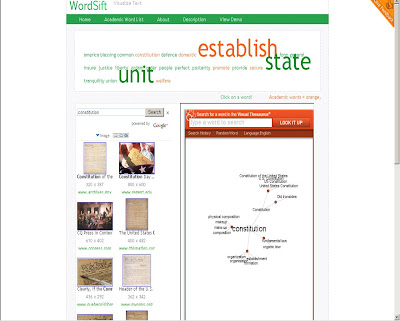

I like the way it links the tag cloud to an interactive visual thesaurus with a speaker option for hearing word pronunciations, a language option for translating into Spanish, Google image and video searches, and sample sentences for context use. The few unexpected and inappropriate images from the results of the Google image and software searches was the only drawback I found to using this software with elementary students.

How could students use this tool? Write a poem or short story or report and WordSift it to discover hidden meanings, new meanings, or more in-depth information and images about the topic. WordSift an article or excerpt from a book and go through the word layers and image/video links to discover new meanings or insights.

Vokis
Vokis are colorful, entertaining, eye-catching, interactive, got your attention fun. A few ways they could be used:

  • to introduce and/or give directions on a web site or email

  • as a vehicle for commenting on a wiki

  • by students to create a short “All About Me” at the beginning of a school year or a "Who am I?" or "What am I?" like the following Uncle Sam example


    Get a Voki now!

VoiceThread
VoiceThread
is my new favorite software. I created a VoiceThread called Sculpting Chicago as an activity for a PGP lesson on sculpture for my PGP group. I'm still not sure how to create logins for students, but I will keep playing with the site.

The VoiceThread site has a Digital Library for sharing teaching ideas. One involved the librarian posting covers of the state award books, briefly book talking each book, and having students leave their voicethread opinions of the books as they read them. Perfect for our Bluebonnet/Lone Star/Taysha lists!

Bookr
The concept is terrific, however, I was VERY disappointed when discovering that personal images couldn’t be used. I even tried uploading images into Flickr and searching by tag name, but without success.

I searched the word cloud in the Bookrarchive of previously saved examples and found a creative use for Bookr called Book of Colors.

I like the interactive feature that calls for not only the understanding of the color word, but the use of discrimination skills to find the object of that color word.

Another sample called American Symbols.

Bookr can be used in place of Power Point or Photo Story, which would leave out the time-consuming transition, custom motion, narration, and music choices, when class time is limited and new or similar software for creating student products is preferred.

Thursday, June 25, 2009

Thing #1 - The Networked Student

We’re back! The Common Craft guys are back! The kickball captains have donned swimsuits and life preservers! Woo-hoo!

Librarians will most definitely play a role in “helping students navigate the future” and continue to help our students become lifelong learners. Joyce Valenza put it well in her article “On the Librarian: What’s the point…?, “if you are not an expert in new information and communication tools, you are NOT a media specialist for today.”

As teacher librarians, our charge in all of this is:

  1. learning the 2.0 technologies (thanks Kickball Captains/Lifeguards!)
  2. teaching/modeling for students and teachers how to use these technologies in collaboration with the classroom teachers and curriculum expectations, while teaching these 3 things - a research model such as the Big6, web site evaluation, and the ethical use of electronic information
  3. giving students the freedom to create their learning environment using the 2.0 technology tools
  4. having the technology hardware (and GEEK support!) for accessing and using these 2.0 tools.